
ECharts 标题组件
之前在 《ECharts 图表组成》 小节中我们已经对 图表的各个组件有了基本的认识,从本小节开始我们将逐个介绍这几个组件,本节我们就来看看这至关重要的一环,没有他你甚至连这个图表表示的是什么都不清楚,他的存在就像是网站的标题那样,但是 “标题虽好可不要贪长” 哦,尽量简洁明了。
1. 简介
title 即标题组件,包含主标题与副标题,ECharts 3.0 版本后支持多个标题组件。
慕课解释:
标题组件对应下图红色框部分:
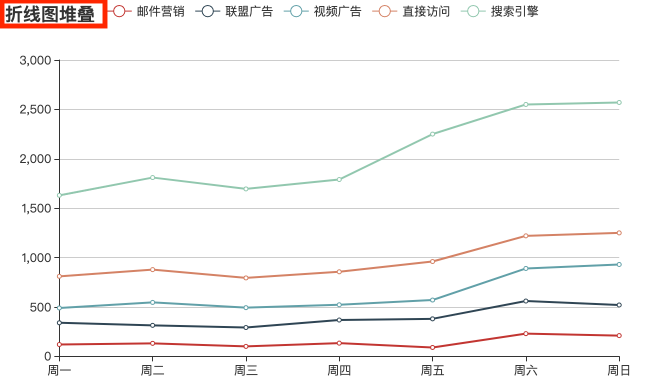
title 组件使用频率比较高,功能也比较完备,除了可以自定义样式、位置等基础功能外,还支持超链接模式,主标题、副标题功能等,下面展开讨论。
2. 配置清单
完整配置项:
| 配置名 | 类型 | 默认值 | 说明 |
|---|---|---|---|
| id | string | 指定后可用于 option 或 API 中引用该组件 | |
| show | bool | true | 是否显示标题组件 |
| text | string | 主标题文本,支持 \n 换行 | |
| link | string | 主标题文本超链接 | |
| target | string | blank | 指定主标题打开链接的窗口,与 标签的 target 属性相似,但只支持 self、blank 值 |
| textStyle | object | 主标题样式配置,详见下文 | |
| subtext | string | 子标题文本,支持 \n 换行 | |
| sublink | string | 子标题文本超链接 | |
| subtarget | string | blank | 指定子标题打开链接的窗口 |
| subtextStyle | object | 子标题样式配置 | |
| textAlign | string | auto | 文本水平对齐方法,可选值: auto、left、center、right |
| textVerticalAlign | string | auto | 文本垂直对齐方法,可选值: auto、top、middle、bottom |
| triggerEvent | boolean | false | 组件是否触发事件 |
| padding | number | Array<number> | 5 | 标题内边距 |
| itemGap | number | 10 | 主副标题间距,单位 px |
| zLevel | number | 0 | 一级层叠值 |
| z | number | 6 | 二级层叠值 |
| left | number | string | auto | 组件离容器左侧的距离,支持三种值:数值如 20,指定像素距离;百分比如 20%,指定相对容器宽度的百分比;字符串,包括:left、center、right、auto |
| top | number | string | auto | 组件离容器顶部的距离,支持三种值:数值如 20,指定像素距离;百分比如 20%,指定相对容器高度的百分比;字符串,包括:top、middle、bottom、auto |
| bottom | number | string | auto | 组件离容器底部的距离,支持三种值:数值如 20,指定像素距离;百分比如 20%,指定相对容器高度的百分比;字符串,包括:top、middle、bottom、auto |
| right | number | string | auto | 组件离容器右侧的距离,支持三种值:数值如 20,指定像素距离;百分比如 20%,指定相对容器宽度的百分比;字符串,包括:left、center、right、auto |
| backgroundColor | string | rgba(0,0,0,0) | 组件背景色,支持 RGB 如 rgb(255, 255, 255)、RGBA 如 rgb(255, 255, 255, 0.5)、十六进制如 #fff |
| borderColor | string | #ccc | 组件边框颜色,支持与 backgroundColor 一样的值 |
| borderWidth | number | 0 | 组件边框线宽 |
| borderRadius | number | Array | 0 | 边框圆角半径,单位为 px,支持传入数值分别制定各个角度的版本,如: [5, 5, 0, 0] //(顺时针左上,右上,右下,左下) |
| shadowBlur | number | 0 | 指定组件阴影模糊值大小,需要设置 show 为 true,且背景色不为 transparent 才能生效 |
| shadowColor | string | 阴影颜色值,默认为组件的 backgroundColor 值 | |
| shadowOffsetX | number | 0 | 阴影的水平偏移量 |
| shadowOffsetY | number | 0 | 阴影的垂直偏移量 |
其中,标题样式 textStyle 及副标题样式 subtextStyle 可参阅 ECharts 文本样式 一节。
3. 示例
3.1 基础示例
定义 title 组件,只需通过传入 title 对象即可完成配置,示例: